Dental clinic software · India For modern dental practice Thirty-day trial

Run your dental clinic, website and bookings from one place.

See who is due for a follow-up and who is late, with the WhatsApp reminder already written. Show a patient their treatment estimate in 3D. Get an email at 11 pm with the day's money and who still owes. Plus appointments, records with a tooth chart and photos, prescriptions, bills, and a clinic website where patients book online.

30-day free trial · Works on computer, tablet and phone · Nothing to install

Fig. 1 — One record, from the first visit to the last sitting
ThirtyDays free, and no card is asked for
OneDatabase for your clinic alone
A5Prints on your own letterhead
NilCharge to take a full copy of your data
01

Everything the front desk and the doctor use every day

Built alongside a working dental clinic, around how Indian clinics actually run: sittings, advances, visiting consultants and medicine batches.

Follow-ups: who is due, and who is late

One list for every patient who should come back. Tap Send reminder and WhatsApp opens with the message already written. Your staff press send.
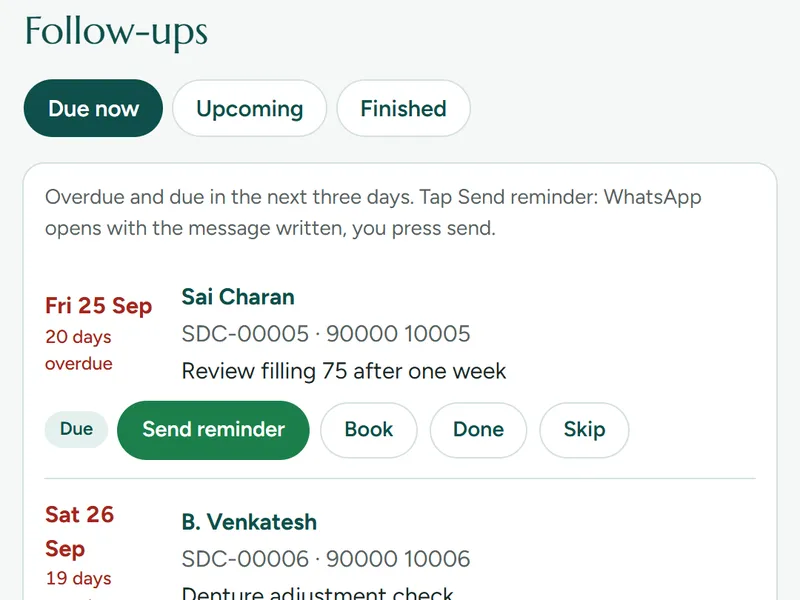
  • Due now, Upcoming and Finished, in date order
  • The number of days a patient is late, in red
  • Plan a course of follow-ups at once, for recalls and cleanings
The Follow-ups list: patients due now, how many days late, and a Send reminder button for each

A calendar the reception can read at a glance

Open the week or the month. A patient who books on your website appears in the calendar, not in somebody's inbox.
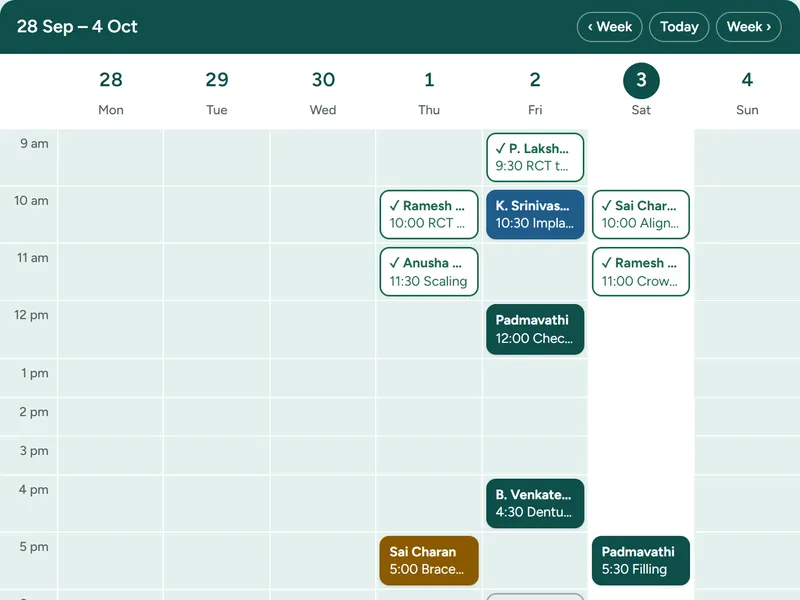
  • Confirm a booking in one tap, with the WhatsApp message ready to send
  • Nothing is copied across by hand
  • Works on the desk computer, a tablet or a phone
The appointments calendar in week view, with each patient's time and treatment

One page for the whole mouth, and the whole history

Complaint, findings, FDI tooth numbers, diagnosis and treatment for every visit, with the full history on one page.
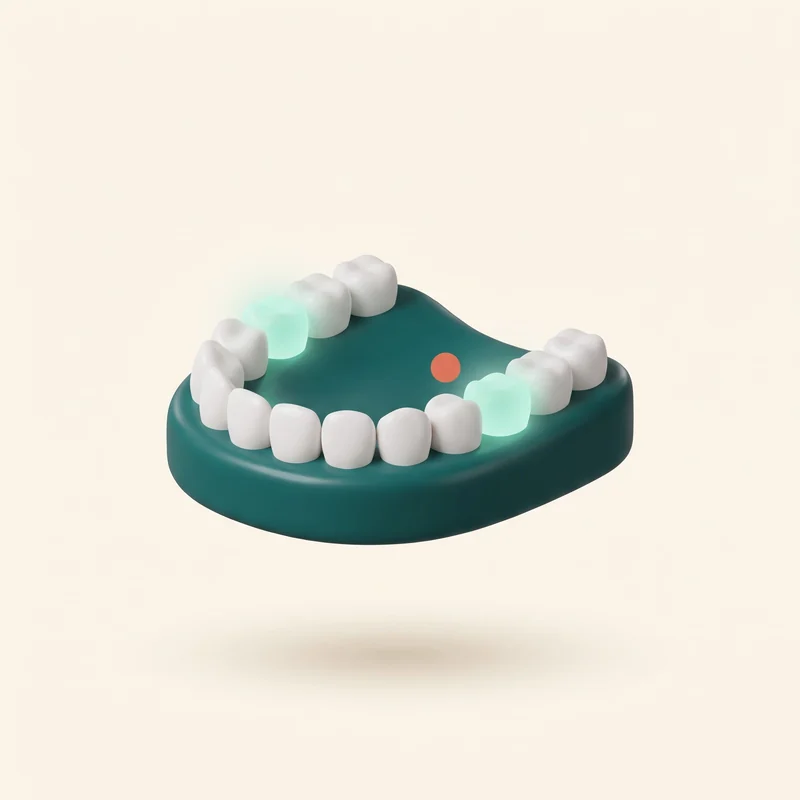
  • A tooth chart with the numbers your doctors already use
  • Every past visit in order, without searching
  • Before-and-after photos filed against the case
A patient's tooth chart on the Clinidanth screen

A billing counter the desk can work quickly

Treatments in sections, with pictures in your clinic's colour. Your favourites are shared by the whole desk, so a bill is a few taps.

  • Discounts, advances used later, part payments and balances that add up
  • Every receipt says what is still left to pay
  • A bill or receipt typed wrong is cancelled by the doctor, with a reason. It is kept and logged, never deleted
The billing counter: treatment sections down the side and favourite treatments as picture cards with their prices

The day's money in your inbox at 11 pm

Every evening the owner gets one email. No need to call the desk to ask how the day went.
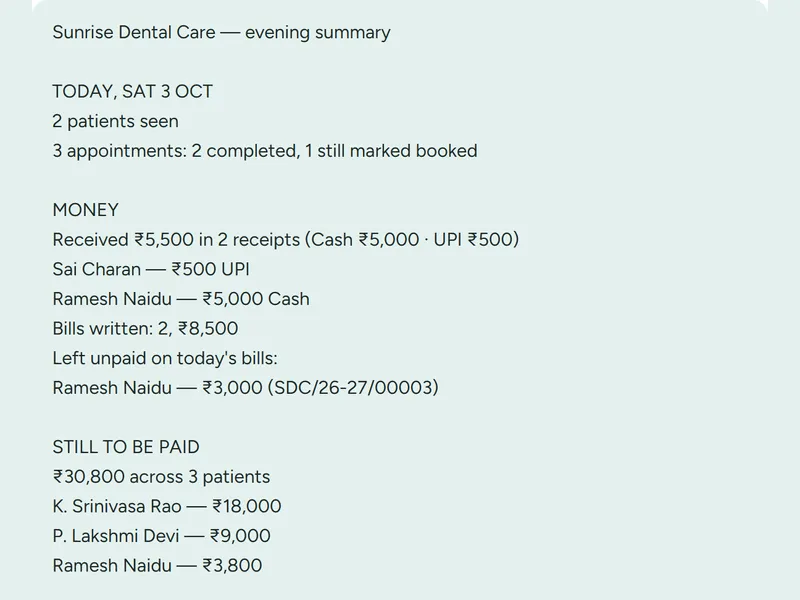
  • Patients seen, and how the day's appointments went
  • Money received, cash and UPI, and the bills written
  • What was left unpaid today, and everyone who still has to pay, by name and amount
The evening summary email: patients seen, money received, bills written and who still has to pay

Food cards after treatment

A picture sheet in English of what to eat and drink, and what not to, after the procedure. The desk sends it on WhatsApp with the after-care message, or prints it on A4.
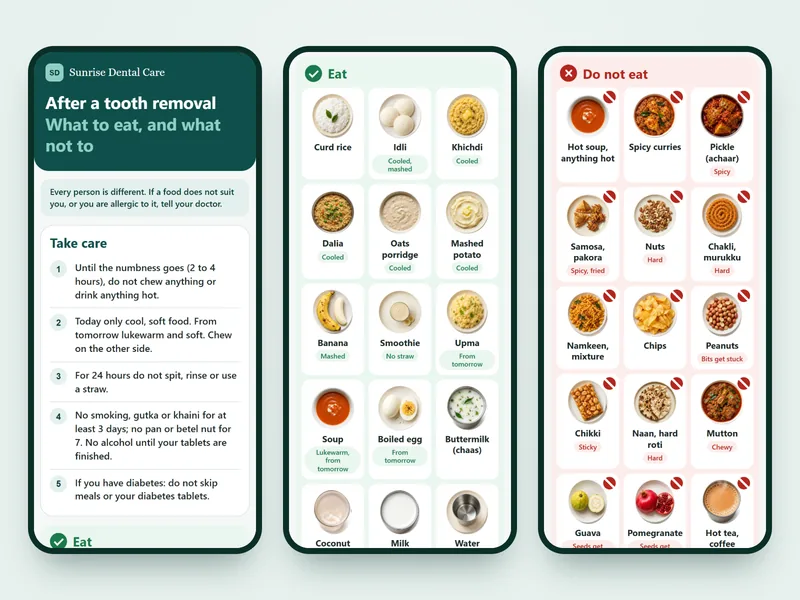

  • Cards for a tooth removal, wisdom tooth or minor surgery, implant (day by day for the first week), root canal, scaling, filling, crown or bridge, dentures, braces or aligners, whitening, and a child's treatment
  • Everyday home food in the pictures, a few plain precautions, under your clinic's name
  • The doctor reads the cards and switches them on. Until then nothing can be sent. On every plan
A food card on a phone: precautions after a tooth removal, the foods to eat in pictures, and the foods not to eat
  • A prescription printed on the clinic's own letterhead

    Prescriptions and A5 prints

    On your own letterhead, with your registration number.

  • A treatment package with its sittings planned

    Treatment packages

    Sittings get planned dates and show up when they are due.

  • Pharmacy stock with batches and expiry dates

    Pharmacy stock

    Batches with expiry dates, earliest expiry sold first.

  • Lab and implant orders with their status

    Lab work and vendor orders

    Crowns and aligners ordered, promised dates, vendor payments.
  • Visiting consultants and what each one is owed

    Visiting consultants

    Who did which procedure, usual fees, and what is still unpaid.

And the messages that used to take a phone call

  • After-care instructions on WhatsApp, sent after the procedure, so the patient has them in writing at home.
  • A review request message, written and ready to send.
  • A written treatment estimate: treatments, teeth, sittings, the wait before each step and the amounts. Printed, or sent on WhatsApp.
  • An estimate corrected later says so, with the date it was revised.
  • Reports for any period you choose: a day, a month, or the dates you pick.
  • On every plan, including the smallest one.
02

A treatment estimate the patient can see

Most patients do not understand a list of treatments and amounts. Show them instead. On Clinic Pro, at the chair.

A tap on the root canal step: the mouth turns to tooth 36 and a short drawing shows how it is done. Sample patient.
  • Show to patient opens the patient's mouth in 3D on your screen. You turn it with a finger.
  • Tap a step and the mouth turns to those teeth, then a short drawing plays of how the treatment is done.
  • Drawings for eight treatments: extraction, implant, crown on implant, zirconia crown, root canal, filling, scaling and bridge.
  • Under each step: what it is, what happens if it is left, why it is advised, and how it helps.
  • Each step with its teeth, sittings and amount, and the total underneath.
  • Shown chair-side. The written estimate then goes to the patient on WhatsApp.
03

The case is in the photos, and the photos stay with the case

Take them on the clinic's own phone or tablet while you work. They are filed against that patient and that visit, so the whole course of treatment is there months later, in order, without anyone searching a gallery.

  • Before, during, after and X-ray, against the tooth numbers, with the date the photo was taken.
  • Shrunk before they are sent, so uploading works on clinic mobile data. A 4 MB phone photo arrives as about 300 KB.
  • Private. No public link exists: a photo opens only for someone signed in to your clinic.
  • Show the patient the difference, side by side, at the end of treatment or at the next recall.
  • Kept as long as the record is, and the patient's consent is recorded with it.
  • On every plan, including the smallest one.
04

A website in your clinic's name, with online booking built in

Patients see only your clinic. Every booking goes straight into your software. Nothing is copied by hand.

A request sent from a patient's phone appears on the clinic's appointment list.

On every plan

A ready page on Clinidanth

yourclinic.clinidanth.in

Doctor, timings, address, map, call and WhatsApp buttons, and the booking form. Live the same day.

On request

Your website on your name

yourclinic.com

The same website on a domain you own, set up on request. Ask us and we will tell you what your domain needs.

Already have a website?

Keep it, add a Book button

Your site + our booking page

Your web developer adds one button or one line of code. Bookings still land in Clinidanth.

More on your page, when you want it

  • Your Instagram posts on your clinic's page. Paste up to six post links and they appear there.
  • An illustrated 3D walk-in: a drawn clinic in your colour and under your name, that patients can walk through.
  • Found in search. Your page carries your clinic's name, area and details in the form search engines read.
05

Your patients' records stay yours

Patient records are sensitive. Clinidanth is built so that you stay in control of them.

  • A separate database for every clinic. Your records are never mixed with another clinic's.
  • A full copy of your data whenever you ask, on every plan.
  • Nothing is deleted if a plan ends. The software turns read-only: you can still open and print every record.
  • Logins for each person. Reception cannot write prescriptions or change clinic settings.
  • Changes are logged with who made them, so questions later have answers.
06

Clinidanth Consultant, for visiting consultants

For dentists who work across many clinics: every case, every implant and every rupee in one place.

  • Case log by clinic, with photos
  • Implant record: brand, size, lot number, sticker photo
  • Charged, received and pending, per case and per clinic
  • Follow-ups due, and monthly reports

What it costs

One price for every clinic, set by the software. Your clinic website and online booking are included. No card is needed: pay by UPI or bank transfer when the invoice appears inside your software.

Solo

A dentist working alone, with one helper.

₹499 a month

or ₹4,999 a year

₹4,999 a year

You save ₹989 against paying monthly

2 staff logins

  • Patients, appointments, visits and prescriptions
  • Bills, receipts, advances and treatment packages
  • Lab work, vendor orders and follow-ups

Clinic

A clinic with staff and visiting specialists.

₹799 a month

or ₹7,999 a year

₹7,999 a year

You save ₹1,589 against paying monthly

5 staff logins

Everything in Solo, and:

  • Visiting consultants and what each one is owed

Recommended

Clinic Pro

A busy clinic that also sells medicines.

₹999 a month

or ₹9,999 a year

₹9,999 a year

You save ₹1,989 against paying monthly

Only ₹200 a month more than Clinic

10 staff logins

Everything in Clinic, and:

  • Pharmacy: stock, batches, expiry dates and GST bills
  • A treatment estimate the patient can see in 3D: their mouth on your screen, turned with a finger; tap a step to see how it is done, with its amount
  • We set it up for you: your patient list imported, your services and prices entered, and a training call for your staff
  • Same-day replies on WhatsApp support
  • Consultant Pro for the owner doctor, to keep your consultant visits and payments at other clinics

On every plan, including the smallest

  • As many patients, visits and bills as you like
  • Your clinic website, with online booking
  • Follow-ups with the WhatsApp reminder already written
  • An email at 11 pm with the day's money and who still owes
  • Works on the computer, the tablet and the phone
  • Your records downloadable as spreadsheets, whenever you ask
  • 30 days free to begin with. Nothing to pay until you decide.
  • No setting-up fee, and nothing charged per patient or per bill.
  • Nothing is deleted if you stop. The software turns read-only: you can still open, print and download everything.
  • Prices are per clinic, and are not charged GST at present.

Request a demo

07

How it starts

  1. Request a demo. We show you the software on a 15-minute video call, wherever your clinic is in India.
  2. We set up your clinic. Your staff logins and your website. On Clinic Pro we also enter your services and prices and bring in your existing patient list.
  3. Use it free for 30 days. Keep going only if it works for your clinic.

Request a free demo

Leave your number and we will call or WhatsApp you to fix a time.

You are

We use your number only to arrange the demo.